Get started
Editor and Viewer together
Connect a prototype you are authoring in the Editor to a Viewer project, so comments are shared between them.
The Editor and the Viewer are two separate tools that share one narrow seam: comments. Connect a repository to a Viewer project, and comments you leave while authoring appear on the Viewer's review page. Comments reviewers leave there appear back in the Editor.
Everything else stays where it is. See What actually syncs below.
The loop#
The Editor shows your prototype as you are changing it. The Viewer shows a build of a commit you have pushed. Both can be running, and you can keep the Editor open the whole time reviewers are working.
- Author in the Editor. Your changes are in your files right away.
- Commit, and publish the branch.
- Build in the Viewer, or let a push webhook do it.
- Reviewers comment in the Viewer.
- Come back to the Editor, read their comments, and author again.
Reviewers are looking at the commit the Viewer last built, not at work you have not pushed yet. Push and rebuild whenever you want them on something newer.
Connect#
You need three things first: a Viewer running, with a project you own (see Try the Viewer to get one going, or Deploy the Viewer for one your team shares); the Editor running against your repository (see Editor on your Mac); and a write-scoped access token from that Viewer.
Note The Editor cannot create a Viewer project. The connect dialog lists projects that already exist and lets you pick one. If the list is empty, create a project in the Viewer first.
1. Mint a write-scoped token in the Viewer#
Open the Viewer, go to /settings, and create a personal access token with the
write scope ticked. The Viewer's token form defaults to read-only, and a
read-only token cannot post comments, so the Editor refuses it at connect time and
asks you to make a new one.
The token is shown once. Copy it.
2. Open the connect dialog in the Editor#
In the Editor's top bar, open the project menu (the project name in the breadcrumb) and choose Connect to viewer…, or Change viewer… if this repository is already pointed somewhere.
3. Paste the URL and token, then pick a project#
Enter the Viewer's URL and paste the token. Choose Connect. This lists the projects the token can see.
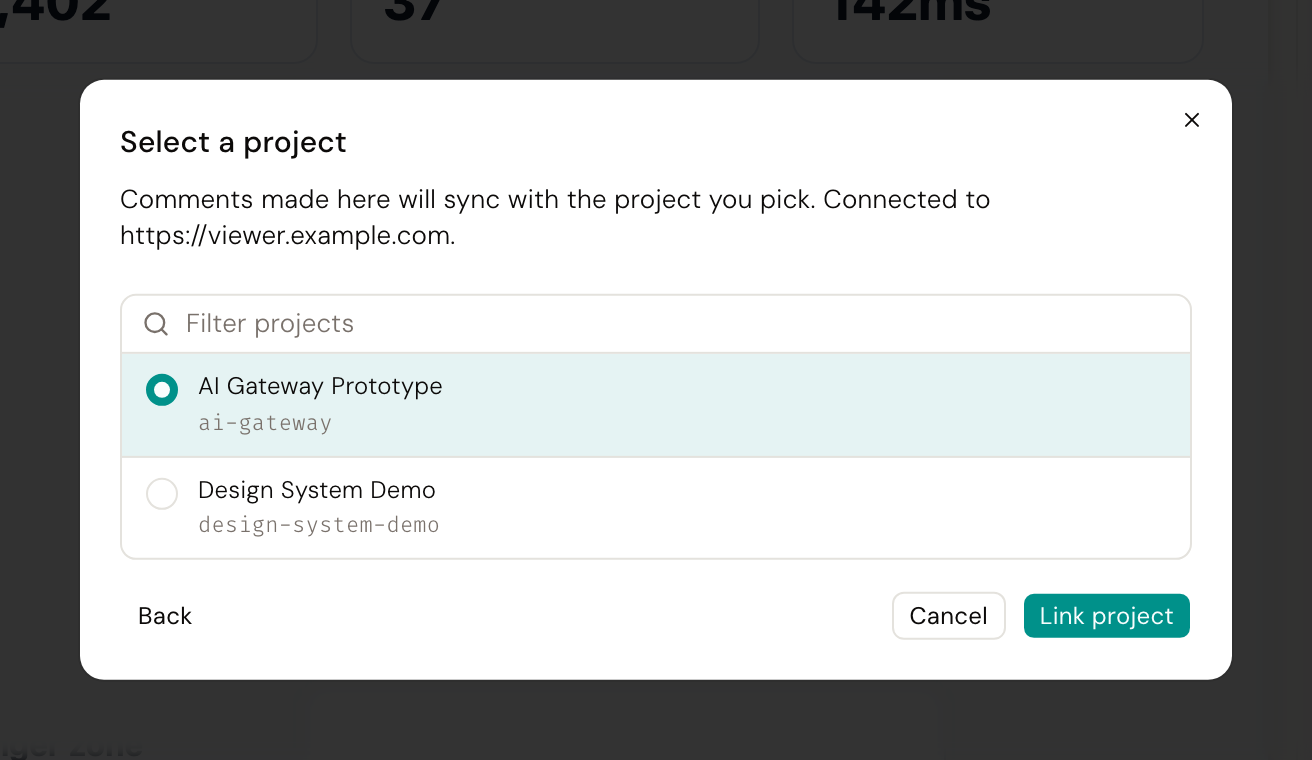
Click a project in the list to finish connecting. The token stays on your machine and never reaches the browser.
What actually syncs#
| Syncs | |
|---|---|
| Comments | Yes |
| Notes | No (local to the repository) |
| Canvases | No (local to the repository) |
| Screenshot plans | No (local to the repository) |
| Chat sessions | No (local to the machine) |
| Edits, branches, commits | No (that is git's job) |
When a repository is not connected to a Viewer, comments are kept locally and the UI shows a local-only badge. Once connected, they sync instead.
Good to know#
- The Editor cannot trigger a build. Builds start from the Viewer's review page, or from a push webhook. Commit and push, then build there.
- Syncing is not instant. A comment posted in the Viewer can take a few seconds to show up in the Editor.
- One Viewer and one project per repository. Connecting again replaces the link rather than adding a second one.
- The Viewer decides comment authorship, from the token, not from what the Editor sends.
More in troubleshooting and Comments on the prototype.