How Desde works
Your design system, understood
Desde reads your component library automatically, so an edit uses your components' real options instead of a one-off override.
Desde reads your component library on its own. When you select a component, you get its real options as real controls, and a change you make uses the component's own settings instead of a pile of overrides bolted onto the outside of it.
Real controls, not a guess#
A component is a reusable piece of your design system, such as a button or a card. A prop is one of its settings, such as its size or its color. A variant is a named choice for a prop that only accepts a fixed set of values, such as small, medium or large.
In the Inspector's Variants and props section, each setting gets the control it deserves. A prop that is only ever on or off is a switch. A prop with a fixed set of values is a dropdown, listing exactly the values that component accepts, so you cannot pick one that does not exist.
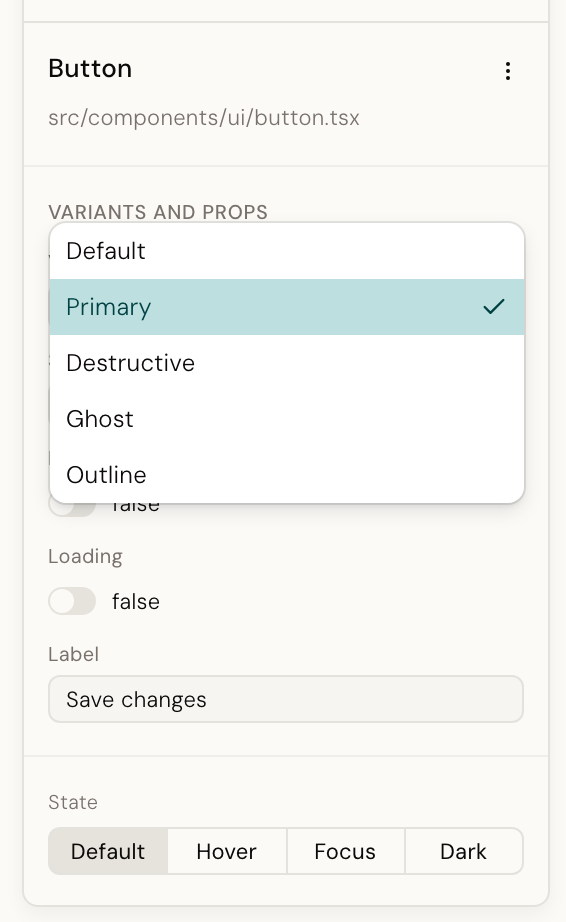
These options come from your design system itself, not from a list someone typed into Desde. That is why they match what your engineers use, and why an edit lands as one of your component's real settings rather than a hand-rolled style on top of it.
The first time is a little slower#
Desde does not need you to list your components anywhere. The first time it meets one of your installed libraries, usually the first time you click a component from it, it reads the library on its own and builds a manifest: a description of that component's props, which ones are variants, and what values they accept.
Reading a large library can take a few seconds. After that first read, Desde remembers what it learned, so later clicks on components from the same library are instant. It reads the library again only when you upgrade it.
A component Desde could not read#
Not every component can be fully understood this way. When Desde could not read a component's full set of options, it still shows the component and still lets you edit the things it did understand, such as its text. You just get fewer controls in the Variants and props section for that one.
Add a design system#
Components written in your own project need no setup at all. A library that copies its components into your repository as source, the way shadcn/ui does, counts as your own components: Desde reads them, with their variants, the moment the project opens.
When you create a project, the design system step says what it found. A project built on shadcn/ui is named as such, with the number of components already available, so an empty list of libraries to add never has to be read as "nothing was detected".
Libraries you install from npm are found on their own too, and listed on that same step. If you want to point it at a library it would not find by itself, such as one kept in a separate repository, open Settings → Design systems and add it there.
The same list is also available as a config file for a team to share and check into their repository. See Editor configuration for the form it takes.
Why this matters#
Without this, "make this button destructive" is a styling problem, and the answer to a
styling problem is usually a class or an inline style bolted onto the button, something like
<button class="bg-red-600 px-3">. With it, Desde knows the button component has an
appearance setting, knows which values it accepts because they came from the component
itself, and knows which one you clicked. The edit becomes appearance="danger": a one-line
change in your design system's own language, correct in every state and at every size
because the component already handles that.
The same knowledge is available to the AI in chat, so a request written in plain language lands the same way. See Why most changes are instant for how an edit gets made once Desde knows where it goes.